How to Properly Use Pop-Ups on Your Website (a ConvertBox Review)
I’ve always believed strongly that website pop-ups are an absolute disaster. You land on someone’s website and just as you’re trying to read the content you came for, you’re bothered by stuff all over the page that’s covering it up. You spend more time closing out boxes than you do reading the page.
And yet, did you know that pop-ups are considered to be an effective marketing tool? It wasn’t until I started using ConvertBox that I realized I could really have the best of both worlds – one where it was possible to draw attention to time sensitive deals or special offerings, while not annoying the crap out of people.
Table of Contents
What is ConvertBox?
It’s difficult for me to just simplify it – I think as you read this blog post and see all the ways I’ve used it, you’ll gain a better understanding of what it really is.
It’s tool for intelligently engaging visitors through personalized offers, lead capture forms, and even segmentation funnels. Basically… it’s pop-ups that don’t piss people off because they are delivered to the right visitors at the right time. It’s all about offering a more personalized experience that you can feel good about.
Best of all, it’s a Lifetime License! That means you’ll only have to pay for it once – no monthly fees to deal with.
How to Use ConvertBox
It took me a while to get around to writing this blog post because I wanted to truly experience the tool and be able to show you a lot of different examples of ways I’ve used it for my business.
There’s so much more to this tool, but here’s ways I’ve used it on my website so far…
"Choose Your Own Adventure"
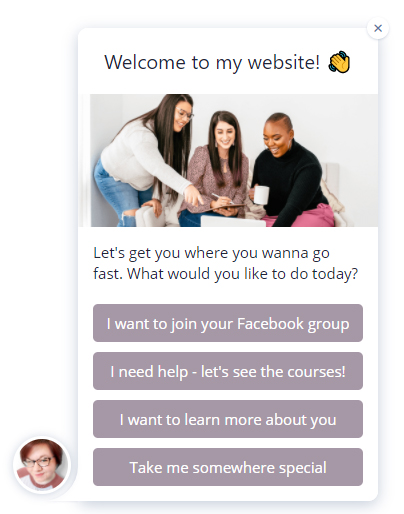
When someone lands on my front splash at KimiKinsey.com, I feel like there’s a lot of directions they could take. I created a Callout Modal which pops in from the bottom, left-hand side of the page with a welcome message and buttons which allow people to choose their own adventure based on what they are hoping to find.
I especially like the “Take me somewhere special” button (it’s what people end up clicking on the most). I change where this button leads from time to time – usually to a special offer, my resource library, or a special event such as my Amazon Prime Day Deals page.
In Use: Homepage
Discount offer based on content they are reading
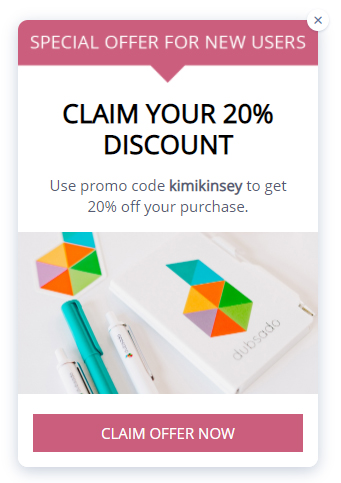
I believe in taking every opportunity to make sure people know about a special deal so that they don’t miss out on it. That’s why I often create pop-ups like this one on blog posts when they are relevant.
This particular one pops in from the bottom, left-hand side on a blog post about Dubsado, and offers a 20% discount if they use my promo code.
Targeted free offer based on the viewed page
Teaching people how to set up a resource library is a big part of my business, so it’s important to me that I capitalize on the real estate that is my own Resource Library.
After spending 45 seconds on my page (which in the website world is a significant amount of time), viewers are prompted with a center page pop-up asking them if they’d like to learn how to create their own page like mine. The button leads to my free course.
But here’s where it gets really interesting. This pop-up is pretty smart. It’s integrated with ConvertKit so that subscribers who have a specific tag won’t see this pop-up at all. Why? – Because there’s no reason for someone who is already enrolled in the free course to receive a pop-up for it.
It’s not a perfect system, mind you. I’m sure there are people who have the tag, but haven’t done actions ConvertBox needs that will pass the information yet to my website. But it’s a heck of a lot better than bothering everyone with it!
In Use: Resource Library
Enticing a visitor to stay
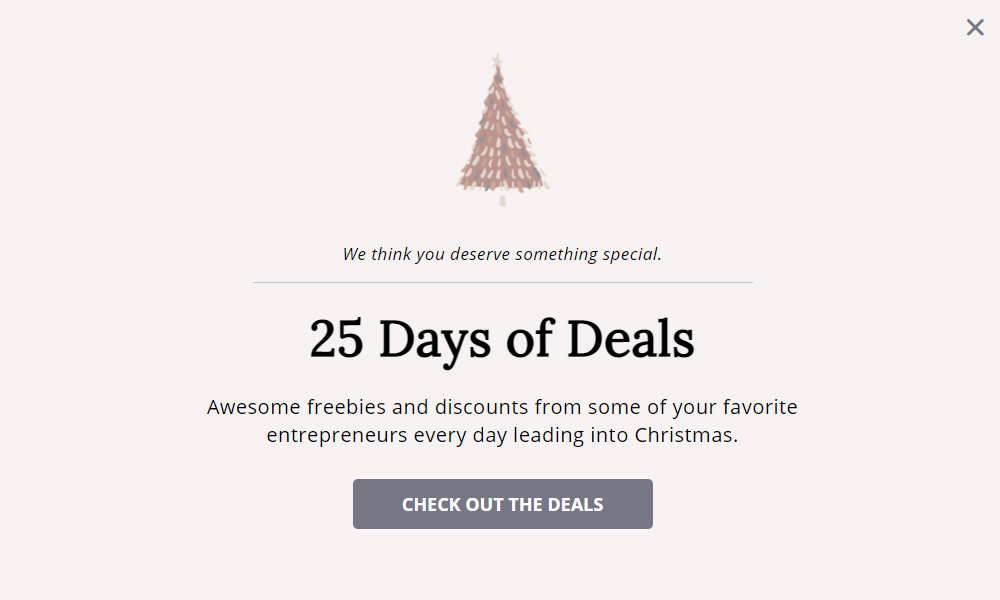
I feel like if you’re gonna set a pop-up to happen in the event someone is caught trying to leave the page, you better make it worth their while to stay.
I created this Full Page pop-up to happen across my website to entice people to stick around and check out my 25 Days of Deals page. It’s a page of freebies and discounts they might want to check out. I mean, who can say no to “Free”!?
I love that I can set pop-ups to not show up on pages they shouldn’t. So for example, this pop-up won’t happen if you’re attempting to abandon the 25 Days of Deals page… because that would just be silly.
In Use: On Page Abandon Website Wide
Special announcements
Every time there’s something to share whether it’s a special event like 25 Days of Deals, my Holiday Deals Page, flash sales, or an upcoming training… I create a top-page banner that leads visitors to the details.
I love that I can keep them really simple, or even include a countdown timer to promote a sense of urgency (this is also fantastic on sales pages).
And of course, I can exclude those pages from having the banner, or prevent certain visitors from seeing the banner ever.
In Use: Top of website (some may be archived)
What else can ConvertBox do?
There’s a lot more that ConvertBox can do, but I don’t want to overwhelm you. I’ve honestly not even used it to its full potential. I feel like that’s something that comes with time.
It’s so much more than pop-ups. In fact, here’s an embedded opt-in form I built in ConvertBox for one of my freebies. These boxes can integrate with most email marketing tools – ConvertKit, MailerLite, MailChimp, ActiveCampaign, and Aweber to name just a few.
In case you need a few more ideas…
- A/B Test pop-ups or forms to figure out which one performs the best with your audience (they can even be totally different types of boxes!).
- Use the targeting to show a discount coupon to existing customers / clients.
- Offer content upgrades in blog posts
- Let people choose their own adventure and set it up so they get a different opt-in box or lead to a different area of your website.
- Create an offer exclusively for return visitors – so if someone visits a sales page, and comes back… offer them a special deal or discount.
- Use the Quiz feature to create a tailored experience, leading your audience to sign up for offers tailored to them.
Behind the Scenes (very Meta)
Watch the video (I recommend on at least 1.2x speed because I’m #VerboseAF) to get a behind the scenes look at the ConvertBox dashboard, and how I used it to create the pop-up you saw at the bottom-left of the screen!
Here’s a special bonus
If you decide to purchase ConvertBox, let me know! I’ll gift you a $50 credit to be spent on anything with me in the next 6 months!
I hope this post Has inspired you to invest in ConvertBox and to try one of the uses I’ve shown here.
Let me know in the comments if you have any questions about this tool and how you might use it for your business! Or, click on the chat bubble in the bottom, right-hand corner and leave me a message.
Don't forget to Pin it!
If you enjoyed the content of this blog post and found it valuable, please save it to Pinterest so that other people can read and learn too!